Platform: TryHackMe
Difficulty: Medium
Categories: Web
Description: The basics of Penetration Testing, Enumeration, Privilege Escalation, and WebApp testing
Attack OS: Parrot Linux
No spoiers!

1. Enumeration:
	First things first, setting our target IP to "IP" in the shell so it's easier to call on later.
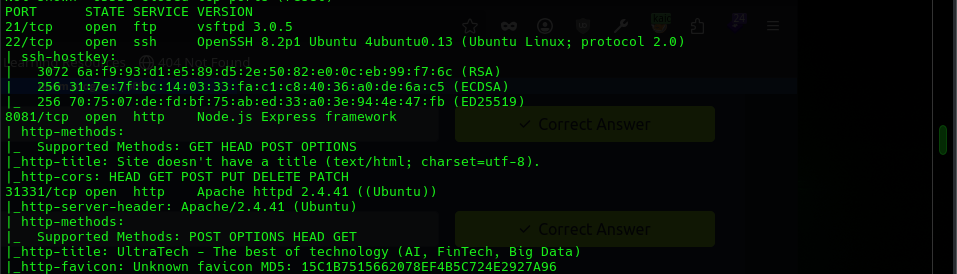
	Then running an nmap scan with "-sV -sS -Pn -T4 -p- -v" set as options. We have a few results to submit from
	the scan pictured that should stand out to you,
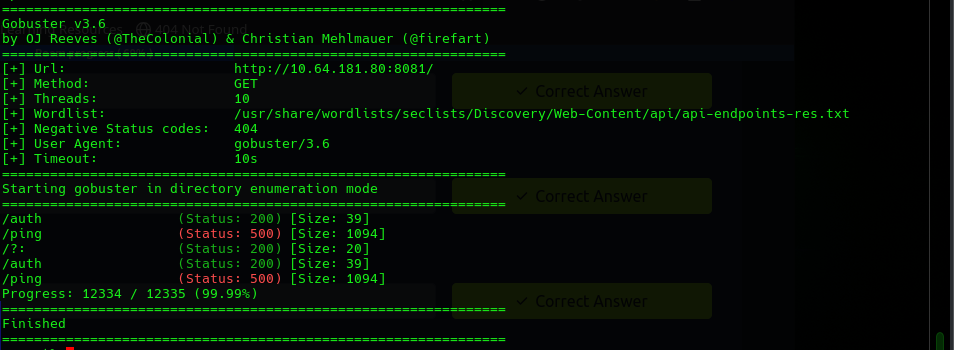
 and the API routes can be found by running gobuster with
	"-u http://IP:8080" and an appropriate wordlist. The one I used is pictured below.
 We'll also head to the IP
	on the port hosting the website and take a look around, looking at robots.txt to find a sitemap file that
	leads to a login page. Now we can move on to exploitation.

2. Exploitation:
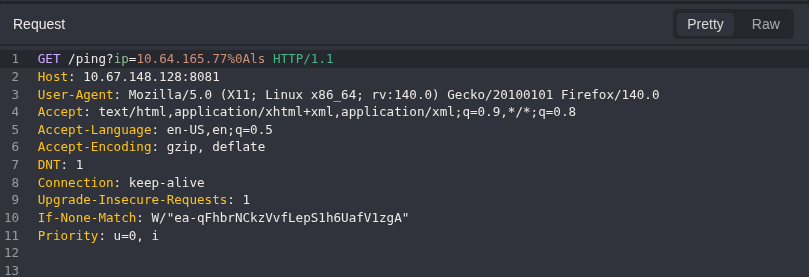
	We have a login page we can access and two API endpoints that are potentially vulnerable. A look at the
	login page shows us it uses the auth endpoint, so capturing requests with burpsuite/caido is the next step
	to take a look at what we might see. Capturing requests gets us our attempted login, but it also gets a
	repeated ping sent from the node.js service. Seeing that our look at the auth response doesn't yield much
	we don't already see through the browser, lets take a look at that instead.
	The ping request simply sends a ping to the IP address in the query.
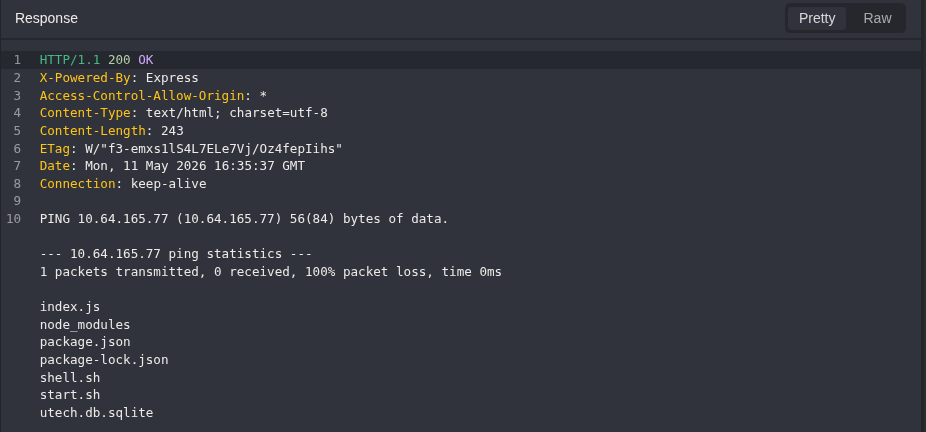
	If we take a look at this request in our browser we can see that the ping output
	is displayed. This is the bug we'll exploit. Because the shell interpets our command before ping
	gets the input, we can inject some commands here. We can confirm this by appending to the URL
	"; echo hello-world" which will give the output pictured.
 But trying a nc -e reverse shell throws an error from
	 ping, telling us that our "-e" is being passed to it. a newline character "%0a" cleans up the output by
	 ending the ping command and starting our command on its own line. This will let us get some cleaner output
	 which prints after the ping output. Testing some more reverse shells through this doesn't get us a shell,
	 but we can have the server download a reverse shell file from us through this and have it executed
	 by the server. This does not work. Attempting to execute a file through this returns permission denied,
	 but we can still get command output so let's remove that file and poke around using caido so we don't have
	 to keep messing with the URL. Running ls lets us find the database in task 3,
 and cat db_filename gives us
	 the hash for task 3 as well. we can run hashcat with "-m {id} {hash} /usr/share/wordlists/rockyou.txt" to get
	 us the password that we can now use to SSH into the server.

3. Escalation:
	We're on our own now. Our last task is to find the first 9 letters of the root account private SSH key.
	ls and ls- a on the home of r00t returns nothing interesting, but running ls on /home shows us the home
	directories of lp1, www, and ubuntu. lp1 appears nonstandard, and running ls on /home/lp1 lets us see
	".sudo_as_admin_successful", something interesting. the file is hidden and we're denied any kind of access
	because of this. we'll need to get into either ubuntu or lp1 to access it, or
	find a way to get straight to root. We can use LinEnum to find opportunities for escalation.
	LinEnum tells us that we are part of the privileged docker group, which we can exploit.
	GTFO bins has a command that will spawn a root shell under these conditions,
	"docker run -v /:/mnt --rm -it {image} chroot /mnt /bin/sh" spawns the root shell and
	Now we take our prize. Cat .ssh/id_rsa prints the root private key for us to take the letters from and...

	We're all done! A successfull enumeration, web app assessment, exploitation, and root escalation in the books.